
The Fluid Swap App: how the dApp works, feature by feature
There is no app-store download called "Fluid Swap." The product is a browser-based dApp you reach through a wallet. Here's how to use every part of it — and the security checks that matter most.
Not the official Fluid website This is an independent educational guide. We are not affiliated with, endorsed by, or operated by Fluid, Instadapp, or CEX.IO. Always verify links on the official fluid.io before connecting a wallet.Last reviewed: June 2026 · By the FluidSwap Guide editorial team
Let's clear up the biggest misconception immediately: searching "Fluid Swap app download" will not lead you to an official native app, and some results you find may be outright dangerous. The genuine Fluid product is a decentralised web application (dApp). You open it in a browser — desktop or mobile — and connect a wallet. That's the whole "installation."
Fake "Fluid" or "FluidSwap" apps that ask for your seed phrase exist. The official protocol is accessed via the web app linked from fluid.io. If an app asks you to type a 12/24-word recovery phrase, it is malware. Close it.
A tour of the interface
The dApp is organised around a handful of tabs. Depending on the release you may see Swap, Lend, Borrow/Vaults, and Liquidity. Here's what each does and the questions to ask before you click "confirm."
1. Swap
This is the "exchange" most people come for. You choose an input token and an output token, the app shows a live quote, the price impact and a slippage setting, and you sign one transaction. Because it routes through Fluid's Liquidity Layer, deep pairs can offer competitive pricing.
- Slippage: the maximum price movement you'll tolerate between quote and execution. Too low and volatile swaps fail; too high and bots can sandwich you. For major pairs, a fraction of a percent is usually fine.
- Price impact: how much your trade moves the pool. Large impact on a thin pair = you're overpaying. Split the order or use a deeper venue.
- Gas: paid in the network's native token. You must hold some (e.g. ETH) or the transaction can't even be submitted.
2. Lend
Deposit an asset into a lending market to earn yield paid by borrowers. The displayed APY is variable — it floats with how much of the pool is borrowed (utilisation). It can look attractive one week and unremarkable the next. There's no lock-up in most markets, but withdrawals depend on available liquidity: if utilisation is very high, you may have to wait for borrowers to repay or for new deposits.
3. Borrow & Vaults (the powerful, dangerous part)
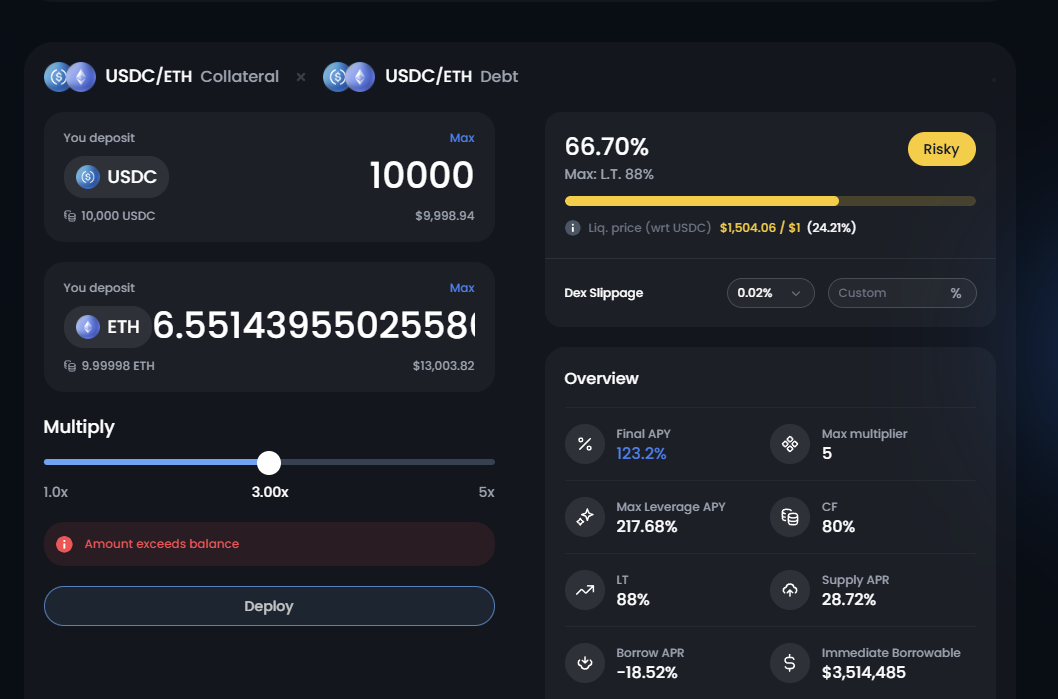
This is where Fluid's reputation for capital efficiency comes from. You deposit collateral and borrow against it. Fluid's vaults have advertised loan-to-value (LTV) ratios as high as ~95% on certain correlated pairs — dramatically higher than the 50–80% common in older protocols. The "multiply" feature lets you loop collateral and debt to build leverage in one click.
High LTV is a double-edged sword. At 95% LTV your liquidation price sits right under your nose. A 5–6% adverse move can trigger liquidation, and you'll pay a penalty on top. Treat the maximum as a cliff edge, not a target.
The interface typically shows a health factor or liquidation price, an LT (liquidation threshold) and your final APY after borrow costs. Watch these like a hawk. A position that looks safe at deposit can become risky overnight if your collateral falls or the borrow rate climbs.
4. Liquidity
Provide liquidity to pools and earn a share of fees. Fluid's twist (Smart Collateral / Smart Debt) means assets can sometimes do double duty — sitting as collateral while also earning swap fees. Powerful, but it adds moving parts: understand impermanent loss and how your LP position interacts with any borrowing before committing real size.
Using the app on mobile
There's no separate mobile build, but the web app is responsive and works inside the in-app browser of wallets like MetaMask, Trust Wallet or Rabby Mobile. The flow: open the wallet app → use its built-in browser → navigate to the official app URL → connect. This keeps the connection inside a trusted environment and avoids desktop QR juggling.
On mobile, scams ride on lookalike URLs and push notifications. Type or bookmark the official address; never reach the app by tapping a link in a Telegram/Discord DM or an ad.
Fees, in practice
You'll meet the same two-layer cost structure as anywhere in DeFi: gas (paid to the chain, brutal on Ethereum mainnet at peak, cheap on L2s) and protocol fees (swap fees, borrow interest). The app estimates gas before you sign — if it looks absurd, wait for quieter network conditions or use a supported layer-2.
Security checklist before every session
- ✅ URL verified and bookmarked (came from fluid.io, not an ad).
- ✅ Wallet is the right one, on the right network.
- ✅ You're reading each signature — does the "approve" amount and spender look right?
- ✅ Large balance? Use a hardware wallet and confirm on-device.
- ✅ Periodically revoke unused token approvals via a reputable revoke tool.
No legitimate dApp ever needs your seed phrase. If anything — a popup, an "app," a support agent — asks for it, you are being robbed.
Smart Collateral and Smart Debt, explained without the jargon
These two phrases are the heart of why people talk about Fluid at all, so it's worth slowing down. In most older DeFi protocols, the moment you pledge an asset as collateral, it goes to sleep — it just sits there backing your loan, doing nothing else. Fluid's idea is to wake that capital up.
Smart Collateral means the assets you've deposited as collateral can also be supplied as DEX liquidity, earning trading fees while they secure your borrowing. Smart Debt flips the same trick on the liability side: the tokens you've borrowed can be put to work as liquidity too, so the trading fees they generate offset part of your borrowing cost. In practice that's how Fluid can advertise eye-catching "net" APYs and even negative effective borrow rates in some markets — the fees subsidise the interest.
It's genuinely clever financial engineering. But "your collateral is also an LP position" means you've stacked impermanent loss and liquidation risk on top of each other. More yield, more moving parts, more ways to be surprised. Don't use a feature you can't explain back to a friend.
A realistic first session, start to finish
Here's what a careful first visit actually looks like, rather than the highlight reel:
Arrive and connect on a cheap network
If Fluid is live on a layer-2 or low-fee chain you support, start there. A failed $40 mainnet transaction is a painful way to learn.
Do a tiny test swap
Swap a few dollars of a major token. Watch the quote, the price impact and the gas estimate. Confirm it lands in your wallet. You've now proven the whole pipe works.
If lending, deposit small first
Supply a small amount, see the position appear, understand how to withdraw, then scale up if you're comfortable.
If borrowing, model the liquidation price
Before you ever click a high multiplier, work out: at what collateral price do I get liquidated? Is that a move that could happen in a normal week? If yes, dial it down.
DEX swap vs centralised swap: which is right for this trade?
| Fluid DEX swap | Centralised swap/convert | |
|---|---|---|
| Custody | Your wallet throughout | Platform holds funds during trade |
| Cost | Gas + pool fee + possible slippage | Spread baked into the quote, no gas |
| Speed | One on-chain block | Instant, off-chain |
| Best when | You're already on-chain, want self-custody, trade liquid pairs | First swaps, fiat on/off-ramp, avoiding gas and network choices |
For a lot of beginners, doing the very first conversion on a centralised venue like CEX.IO Convert — then moving on-chain once they're comfortable — is the lower-stress path. There's no wrong answer; there's only the right tool for the trade in front of you.
The mistakes we see again and again
- Maxing the multiplier on day one. Leverage feels free until the first 8% candle against you.
- Ignoring the gas token. You can hold a fortune in stablecoins and still be unable to transact without a little ETH for gas.
- Approving "unlimited" without thinking. Convenient, but it leaves a standing permission a hacked or malicious contract could exploit later.
- Chasing the highest APY. The flashiest yield usually sits on the thinnest, riskiest market. Ask why it's that high.
- Treating the dApp like a bank. There's no overdraft forgiveness and no fraud hotline. You are the risk department.
Next: the exact click-by-click connection guide, or learn how to pick and harden the wallet you'll connect with.